Legacy Software Modernization: Five Paths and How to Choose
Your old system still runs the business. Here is how to choose between rehost, replatform, refactor, rebuild and replace, how the strangler fig pattern works, and what AI code tools can really do.
Your old system still runs the business, and nobody wants to touch it. Age alone is not the problem, because plenty of old code works. The problem is usually more specific: the platform has lost support, the last person who understands it is leaving, or every change takes months. Name that problem first, because each one has a different and often cheaper fix than a rewrite.
Ian Cartwright, Rob Horn and James Lewis of Thoughtworks make the same point in their work on legacy displacement: agree the outcome you want, split the problem along seams, deliver in pieces, and change how the organization works so the new system does not age the same way. This guide covers the choice of path, the strangler fig pattern, what AI tools can and cannot do, and what we would do first.
Five Paths for Legacy Software Modernization
Four of these names follow the strategies in AWS's migration guidance, where they describe moves to the cloud. Rebuild is the plain term for writing new code. The last column is our judgment.
| Path | What changes | Good when | What it leaves unfixed |
|---|---|---|---|
| Rehost | Where it runs, with no code changes | Hardware or hosting is the problem | All code and knowledge problems |
| Replatform | A layer, such as moving to a managed database | One layer is unsupported or costly | The application's design |
| Refactor | The structure of the code | You have tests and people who know it | Little, if funding lasts |
| Rebuild | The code itself, new behind the same job | It blocks the business and sets you apart | Your data problems, unless you fix them too |
| Replace | You buy a product | The work is standard for your industry | Your dependence on a vendor |
Check two more options first. AWS's list also includes retain and retire. It treats an application with average CPU and memory below 5% as a candidate for retirement, along with anything with no inbound connections for 90 days. A system you can switch off is the cheapest modernization there is, and retaining one that rarely changes is often the right decision.
Order matters too. AWS calls refactoring the most complex and costly of its strategies, and for large migrations it recommends moving first and modernizing afterward.
Choose a Path for Your System
Answer seven questions about the system. Age, tests, documentation, staff knowledge, outage risk and change rate shape the technical answer. The seventh, whether the system sets you apart, decides whether a product should replace it.
Three rules carry most of the weight. A system that rarely changes should not be rebuilt, because you would pay to move problems nobody is feeling. Weak tests or missing knowledge count against refactoring, because you cannot prove a change is safe. And standard work leans toward a product, because a product's upkeep is spread across its customers.
Why Big-Bang Rewrites Go Wrong
Joel Spolsky made the classic case in April 2000. Netscape spent close to three years rewriting its browser while its market share collapsed, and he argued that old code holds years of bug fixes nobody remembers. Martin Fowler says full replacements "go down in flames most of the time." Users cannot wait for new features, and existing behavior is hard to document.
The trap has a name. Cartwright, Horn and Lewis call it feature parity: the promise that the new system will do everything the old one does. They report that "people greatly underestimate the effort required," and that parity tends to lead to one big cut-over. Much of what you would copy is unused features and workarounds. Parity is worth it only in narrow cases, such as tools for expert users or behavior fixed by a specification.
TSB is the case to read, and to read fairly. It was a platform migration, not a code rewrite, but the risk has the same shape. The regulator's notice says TSB chose a "predominantly single event" migration, with some functionality moved earlier. It had reasons: the cost and difficulty of staging, and a wish to keep customers' view of their products in one place. The notice also says rollback was not possible, so a serious problem would hit its customers all at once. A reduced test on the data centers, decided outside proper governance, likely would have found a fault that later took internet and mobile banking down for periods.
So the lesson is about reversibility. Before any cutover, ask how you would go back. If the answer is that you cannot, treat that as the largest risk in the plan.
The Strangler Fig Pattern
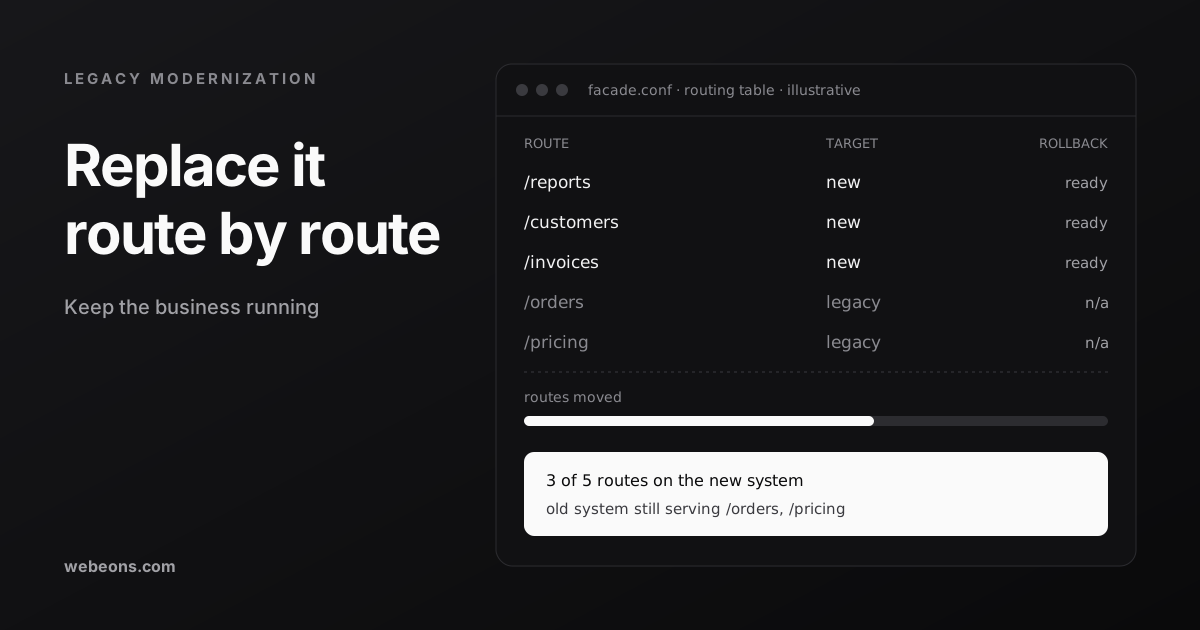
Martin Fowler named this pattern after trees he saw in Queensland in 2001. A fig grows around its host until it can stand alone, and the host may die, "leaving the fig as an echo of its shape." In software, you build new functionality beside the old system and move behavior across a piece at a time.
Microsoft's description sets out the mechanism. A facade, usually a proxy, sits in front of both systems and decides where each request goes. Step through the phases below.
The facade can be plain configuration. Here is the idea in nginx, with made-up service names:
upstream legacy     { server legacy.internal:8080; }
upstream reports_v2 { server reports.internal:3000; }

server {
  listen 443 ssl;

  # moved: one line to point it back
  location /reports/ { proxy_pass http://reports_v2; }

  # everything else stays where it is
  location /         { proxy_pass http://legacy; }
}
Moving requests is the easy half. Data is the hard part. Microsoft's guidance copies a domain's tables to a new database, keeps them in sync with change data capture, checks that both agree, and only then cuts over. You can roll back until you remove the old tables, so removal should be a deliberate final step for each domain.
The pattern has real costs. Fowler calls the coexistence layer transitional architecture, which is code you write in order to throw away. The facade must not become a single point of failure or a bottleneck. The two systems will call each other, so you need an anti-corruption layer to stop old conventions leaking into the new code. It also does not fit every case. Microsoft says to skip it when requests cannot be intercepted, when you cannot change the old system at all, when the system is small enough to replace outright, or when you must decommission quickly.
What AI Code Tools Can and Cannot Do
The published evidence is more useful than the headlines. It splits along one line: how well can you check the output?
| Task | Evidence | Read it as |
|---|---|---|
| Reading old code | Thoughtworks estimated reverse engineering 10,000 lines of COBOL could fall from about 6 weeks to about 2 | Promising, but a proof-of-concept estimate |
| Repeated changes, with checks | Google: 74.45% of changes in 39 migrations came from an LLM, and developers estimated 50% less time | Strong, on Google's own tools and code |
| Repeated changes, with checks | Airbnb: nearly 3,500 test files in six weeks against a 1.5-year estimate, with 97% automated | Strong, since tests had to pass at each step |
| Legacy bugs and migration | Factory's Legacy-Bench, April 2026: best COBOL pass rate 34.8%, migration the weakest task type | Caution, from a vendor that sells agents |
| COBOL migration | OpenAI, October 2026: 86.6% to 97.9% on hidden tests requiring byte-for-byte parity | Fast progress, unverified and not comparable |
Read the Google and Airbnb results closely. Neither was a modernization of an undocumented system. Google's case was mainly widening ID types, and Airbnb's had Jest, lint and TypeScript gates at each step. The work was repetitive and the checks were automatic. The last 3% at Airbnb, just under 100 files, still took people about a week.
Legacy-Bench shows the other side. Agents almost always finished, and in 97% of failures they believed they had solved the task. COBOL bugs tend to be silent, so a wrong answer looks like a right one. Factory's tests only approximate mainframe behavior, and the OpenAI results suggest models are improving quickly. OpenAI itself says production use "still requires expert review and testing against the system's business rules."
Anthropic argued in February 2026 that AI can move COBOL modernization to "quarters instead of years," because understanding the code is the expensive part. The post gives no measured customer result. IBM replied the same day that translating a language is not the same as modernizing a system, since transactions, data and runtime behavior come along too. Both sell something here, and we think both are partly right.
Our advice: use AI to map old code, draft documentation and draft tests that record current behavior, with a person checking the result. Use it for repeated changes where a machine can verify each one. Compare old and new outputs on real inputs before you trust a translation. Keep people on business rules and on the decision to cut over.
What We Have Done Ourselves
We have faced smaller versions of these choices, and the same logic applied.
- Stop before the risky part. AskOrac, an AI chatbot platform we built, is a young codebase, and the same logic applied. We pulled limits, lifecycle and escalation out of the chat route into a channel-agnostic engine that returns a typed outcome. Then we stopped at the first phase on purpose, because rewriting the streaming path too would have put the core revenue path at risk.
- Extend when replacing costs more. On The Bookish Elf, a review publication running since 2018, we kept WordPress and added a custom plugin. Editors kept their workflow and thousands of URLs kept their rankings. The price is working around an older theme and caching plugin.
- Make every step reversible. On the same site, each feature ships switched off, gets previewed on the real site, then turns on. In BlurbBio, an AI writing platform we built, every risky change carries a kill switch. Both add code to maintain.
- Recheck after every migration. One data migration on The Bookish Elf quietly removed internal links and orphaned posts we had already fixed. Orphans are now recounted after any migration.
What We Would Do First
- Write down the problem and the outcome. Lower cost of change and retiring an unsupported platform lead to different plans.
- Measure real usage. Find out which features, reports and integrations people use. Retire what nobody touches.
- Interview the people who know it. Do this now, while you still can.
- Record current behavior in tests. Cover the money paths first.
- Put the facade in, and move one low-risk slice. This tests your deployment, monitoring and rollback for real.
Costing each slice works like any other estimate, and our custom software cost guide shows how to build one. If a product might do the job, read our custom software vs SaaS guide first.
Where This Is Heading
- Support dates will keep forcing decisions. Microsoft ended extended support for SQL Server 2016 in July 2026, with Extended Security Updates listed through July 2029. Windows Server 2016 follows in January 2027. Those dates suit a rehost or replatform, but a deadline is no reason to rewrite.
- Reading old code is getting cheaper. Between Factory's April results and OpenAI's October claims, measured capability appears to have moved fast, though on different and partly unverifiable tests. We expect discovery to take less time, and verification to take a larger share of the budget.
- Plans are getting more scrutiny. In July 2025, the GAO named 11 US federal legacy systems most in need of modernization, aged 23 to 60 years. Nine had modernization plans, and only three of those included milestones, a description of the work and a plan for the old system. It asked Congress to consider requiring such plans. Those three items are a fair test for yours.
Start With One Slice
You do not need a multi-year program to begin. You need a stated problem, tests around today's behavior, and one piece you can move and move back. Our backend and API work covers facades, data migration and new services, and our cloud and DevOps work covers rehosting, deployment and rollback. We do not list a price for this work, because it depends on what the system turns out to contain. Tell us about your system and we will tell you what we would check first, including when the right answer is to leave it alone.
Sources (18)
Common questions
What is legacy software modernization?
It is changing an old system so it stops holding the business back. The usual paths are rehost, replatform, refactor, rebuild and replace. Retiring or keeping the system are also valid outcomes, so start by naming the actual problem.
Should we rewrite our legacy system from scratch?
Rarely all at once. Rewrites run into hidden behavior and long delays, and Martin Fowler says full replacements usually fail. If you do need new code, move one slice at a time behind a facade so each step can be reversed.
What is the strangler fig pattern?
You put a facade in front of the old system, build new parts beside it, and redirect requests one piece at a time until the old system can be switched off. It suits large, risky systems. Microsoft advises against it when requests cannot be intercepted or the system is small enough to replace outright.
Can AI tools modernize legacy code?
They help with reading old code, drafting documentation and tests, and repeated changes that can be checked automatically. Results on real legacy behavior are less settled. In Factory's April 2026 benchmark the best COBOL pass rate was 34.8%, and OpenAI's higher October 2026 figures are unverified. Keep behavior tests and expert review.
How do we choose a legacy software modernization company?
Ask how they would make each step reversible, how they prove behavior did not change, and what they would retire. Be wary of a fixed plan before anyone has read the code, and of any promise of full feature parity. Our buyer's guide covers general vetting.
Have a system nobody wants to touch?
Tell us what it does, what's wrong with it and who still understands it. We'll tell you which path we would test first, including when the right answer is to leave it alone.