Custom Software vs SaaS in 2026: What to Build and What to Keep Buying
AI made code cheaper to write, and left the cost of owning it alone. Here is what the data shows, a three-year break-even calculator, and which tools we would replace.
Should you replace your SaaS tools with custom software now that AI has made code cheaper to write? Sometimes, and less often than the headlines suggest. For fifteen years the default advice was never to build what you can buy, and that advice is now wrong at the edges and still right at the core. Below is what the data shows, how to run the numbers on your own case, and which tools we would and would not replace.
What Is Actually Happening
Retool's 2026 Build vs Buy report points the same way. Of 817 builders surveyed in late 2025, 35% said they had replaced at least one SaaS tool with a custom build, and 78% expected to build more of their own tools in 2026. Retool sells a platform for building internal tools, so it has an interest in this result, and the respondents were its own customers and builders, a group more likely to build than most.
Now look at the other side. Gartner's July 2026 forecast puts worldwide software spending at about $1.47 trillion this year, up 15.5% from 2025. Skipping one feature is a long way from cutting the software budget. Gartner also says agentic AI could affect $234 billion of enterprise software revenue by 2030, and its managing VP George Brocklehurst was clear that "SaaS will not be destroyed; it will emerge in a different form."
Our reading: companies are replacing some tools at the edges while total software spending keeps rising. That is a real shift, and it is well short of an exit.
What People Are Replacing First
When Retool asked which categories were at risk of replacement, the list was mostly internal, narrow and specific to each company.
These are tools where a company often uses a small part of a big product. That fits another figure: Zylo, which sells license management, says organizations leave 46% of their licenses unused on average. Its page gives no source for that number, so treat it as vendor marketing. Your own usage data will tell you more in an afternoon.
The Part That Did Not Get Cheaper
When you replace a SaaS tool, you take on everything the vendor used to do for you. A build quote prices the first month. These lines arrive every month after it.
- Security and patching. In Veracode's 2026 testing, about 44% of AI code generation tasks introduced a known vulnerability. Someone has to catch that. We cover what to check in our vibe-coded app checklist.
- Uptime, backups and on-call. When it breaks on a Saturday, it is yours.
- Knowledge. If the one person who built it leaves, you have a system nobody understands.
- The compliance paperwork. Access logs, SOC 2 evidence and data retention no longer come with the invoice.
- Sprawl. Retool found that 60% of builders had made something outside IT oversight in the past year. Unreviewed internal tools are how sensitive data ends up on the public internet.
- Other people's schedules. A custom tool still depends on vendors. OpenAI gave developers three months' notice on GPT-4o, and our migration guide shows what that kind of date does to a roadmap.
McKinsey's numbers carry a warning here too. CIO Dive quotes McKinsey's Michael Chui saying agentic tools use more compute and cost more, one in five respondents said their organization limits some AI use because of operating costs, and the share of employees reporting cost savings from AI has not moved from last year.
We see the ownership cost in production. BlurbBio, an AI writing platform we built, runs on two deploy surfaces, and some releases have to go out in a set order, because a newer print service rejects requests from an older app. No SaaS customer ever has to think about that. If you build, someone on your side does.
Run the Numbers
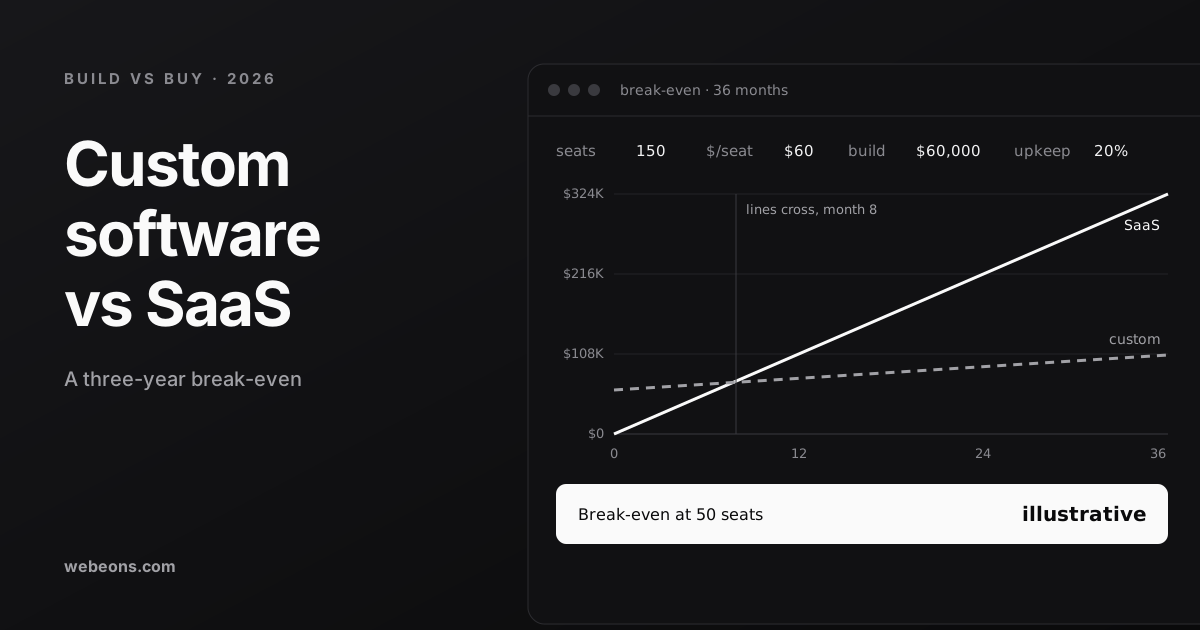
Here is a three-year comparison you can change. The defaults are illustrative. On the custom side we assume a $60,000 build, the middle of our $40,000–$80,000 MVP range, plus 20% of the build per year for upkeep (a planning assumption, $12,000) and $3,600 a year for hosting. That totals $106,800 over three years. On the SaaS side we assume $60 per seat per month with no price rise.
The same assumptions at four seat counts:
| Seats | SaaS, 3 years | Custom, 3 years | Cheaper option |
|---|---|---|---|
| 15 | $32,400 | $106,800 | SaaS, by $74,400 |
| 40 | $86,400 | $106,800 | SaaS, by $20,400 |
| 50 | $108,000 | $106,800 | About even |
| 150 | $324,000 | $106,800 | Custom, by $217,200 |
At 150 seats the lines cross in month 8, which is why large per-seat bills attract attention. Move the sliders and the picture changes quickly. A 7% yearly price rise pulls the break-even down to 47 seats. A $20,000 internal tool on the same upkeep and hosting assumptions breaks even at about 20 seats. Both are illustrative sums, and neither figure is a quote.
Three things can shift the answer. A small internal tool may cost far less than an MVP. Vendor price rises move it toward custom. And the sum leaves out the cost of migrating your data and retraining your team, which is rarely zero. Seat count is still the first thing to check: below your break-even, building to save money rarely works, and the only good reasons left are control and fit.
When to Build, When to Buy
| Build it when | Keep buying when |
|---|---|
| The process is how you beat competitors | The process is the same at every company |
| You use a small part of a large, per-seat product | You use most of the product and it keeps improving |
| Integration work is already your biggest pain | The vendor's integrations already cover you |
| You want your customer data or AI models under your control | A breach or error there would be a legal problem, as in payroll, tax and accounting |
| You will sell it, or it is part of the product | Nobody would own and maintain it after launch |
We would not rebuild payroll, accounting, email delivery or payment processing. Rules change, the failure cost is high, and these vendors spend more on the problem than you ever would. We would look hard at custom admin panels, approval workflows, client portals and reporting tools stitched together from exports.
The Option Most Teams Miss: Do Both
The choice is rarely all or nothing. Often the best answer is to keep the SaaS product as the system of record and build a thin custom layer on its API: a client portal on top of your CRM, or an internal screen that does the one job your team does forty times a day. You can drop paid seats for people who only need that screen, while the vendor keeps handling the hard parts.
Check the vendor's API terms and pricing first, as some charge extra for API access, and confirm that dropping seats is allowed under your contract. This is usually what we would try first, because it is the cheapest way to test whether a custom workflow is worth owning.
Four Questions Before You Decide
- What will the tool cost over three years at your realistic seat count, including planned price rises?
- Which features do your people actually use? Check the usage data, not the contract.
- Who owns the custom version after launch: fixing it, patching it and answering for it?
- What happens to the business if it is down for a day?
Where This Is Heading
Three dated facts are worth watching, because each one moves the break-even in this article.
- Spending is expected to move, gradually. SDxCentral reports Gartner's prediction that 20% of planned enterprise software services spending will be diverted to AI-driven alternatives by 2030. That is a large number, and it still leaves most of the money where it is.
- Seat pricing has a rival. Fin lists its AI agent at $0.99 per outcome rather than per seat. When a vendor bills by outcome, the seat count in the calculator above stops being the right input, and you should compare cost per finished task instead.
- Running AI features keeps getting cheaper at the low end. OpenAI launched GPT-6 Luna in September 2026 at $0.10 per million input tokens, and a spokesperson told VentureBeat the rate is permanent. That helps the custom side on model fees. It does nothing for patching, on-call or the person who has to own the thing.
Next Step
If the numbers point to building, we can help you scope it, whether that is a focused internal tool, an MVP or a full SaaS platform, which we list at $40,000–$150,000+. Tell us which tool you are thinking of replacing, how many seats you pay for and what you actually use it for. If buying is the better choice, we will say so. For budget detail, see what a SaaS product costs to build, and for the AI side, what an AI agent costs.
Sources (8)
Common questions
Is custom software cheaper than SaaS?
It depends on seat count. In our illustrative model, a $60,000 build with 20% yearly upkeep and $3,600 yearly hosting costs $106,800 over three years, which breaks even at about 50 seats against a $60-per-seat tool. Migration and retraining are not included.
Can AI replace my SaaS tools?
For some narrow internal tools, yes. Retool's survey, from a vendor with an interest in the result, found 35% of builders had replaced at least one SaaS tool. Gartner still forecasts software spending up about 15.5% in 2026, so the change is at the edges.
Which SaaS tools should I never replace with custom software?
We would not rebuild payroll, accounting, email delivery or payment processing. Rules change, the cost of failure is high, and those vendors spend more on the problem than you would.
What is the alternative to choosing between build and buy?
Keep the SaaS product as the system of record and build a thin custom layer on its API, such as a client portal or a single-purpose internal screen. Check the vendor's API terms and pricing first.
Find out whether replacing that tool pays off
Tell us which SaaS tool you are thinking of replacing, how many seats you pay for and what your team actually uses. We will tell you whether to build, buy or do both.