Supabase vs Firebase vs Neon: Pricing, Data Model and Lock-In
How Supabase, Firebase and Neon really meter, with prices read from each vendor's page, plus data model, auth and row-level security, vector search, your exit path, and when to use none of them.
For most new products we would start on Postgres, and the choice between Supabase and Neon comes down to how much backend you want bundled. Firebase is the better pick for a narrower set of apps: data that fits documents, a mobile client that needs live updates, and a team already at home on Google Cloud. The bill matters less than the data model at the start, and more as you grow.
We should say where we stand. All three of our own products run on Supabase, so we know its trade-offs from the inside and have a reason to favor it. We have tried to be fair to the other two, and every price below comes from the vendor's own page, read on November 3, 2026.
Supabase vs Firebase vs Neon at a Glance
| Supabase | Firebase | Neon | |
|---|---|---|---|
| Core database | Postgres | Firestore, a NoSQL document database | Postgres, serverless |
| Bundled | Auth, file storage, edge functions, realtime | Auth, storage, functions, hosting | Auth (managed Better Auth), a REST Data API, branching |
| Access control | Postgres row-level security | Firebase Security Rules | Postgres row-level security |
| Main meter | Plan plus compute size, always on | Document reads, writes and deletes | Compute-hours, scales to zero |
| Free tier | 2 projects, 500 MB, pauses after a week idle | 50,000 reads and 20,000 writes a day | 100 compute-hours and 1 GB per project |
| Vector search | pgvector | Built-in, flat index, up to 2,048 dimensions | pgvector |
Postgres vs Documents: The Data Model Decides Most of It
Firebase's docs describe Firestore as "a NoSQL, document-oriented database". Data lives in documents grouped into collections, and a document can hold its own subcollections. That shape is natural for chat rooms, user profiles and feeds, where you read one thing and its children.
It gets awkward when your data is a web of relationships. "Show every unpaid invoice for customers in this region, with their account manager" is one SQL query with joins. In a document store you usually copy data into several places so each screen can read it in one go, and then keep those copies in step. That is a real, ongoing cost, and in our judgment it is the strongest reason to start on Postgres when your data is relational.
Supabase and Neon are both Postgres, so the data model is the same: tables, joins, constraints and transactions. The difference is around the database. Supabase gives you auth, file storage, realtime and edge functions on one bill. Neon gives you a database that pauses when idle and can branch a copy for each pull request, and you add the rest. Firebase now offers Postgres too, through SQL Connect on Cloud SQL, defined in GraphQL. It is worth a look if you are set on Google Cloud, but it is a different product from Firestore with its own pricing.
Firebase vs Supabase Pricing: How Each One Meters
This is where comparisons go wrong. Each vendor counts a different thing, so the same app gets three differently shaped bills.
// Firestore: a query is billed per document read, with a minimum of one.
const snap = await getDocs(query(collection(db, "orders"), where("status", "==", "open")));
// 240 open orders returned = 240 reads. A live listener bills again for each changed document.

-- Postgres on Supabase or Neon: the same query costs compute time, not reads.
select * from orders where status = 'open';Firebase bills per document operation. In us-central1, Firestore Standard edition is $0.03 per 100,000 reads, $0.09 per 100,000 writes and $0.01 per 100,000 deletes, after a free 50,000 reads, 20,000 writes and 20,000 deletes a day. Every query costs at least one read, and a live listener is charged a read each time a document in its results is added or changed. Sign-in is free to 50,000 monthly users, then Google's Identity Platform charges $0.0055 per user up to 100,000 and $0.0046 per user beyond that, for email, phone and social providers.
Supabase bills a plan, then compute. Pro is from $25 a month and includes 100,000 monthly users, an 8 GB database, 250 GB of egress and 100 GB of file storage, plus $10 of compute credit, which covers a Micro instance with 1 GB of RAM. Larger compute is $15 a month for 2 GB and $60 for 4 GB. Overage is $0.125 per GB of database, $0.09 per GB of egress and $0.00325 per user. The Free plan pauses a project after a week without activity and has no automatic backups, so treat it as a prototype tier.
Neon bills for compute while it runs. On the Launch plan a compute unit, which is 4 GB of RAM, costs $0.106 an hour, storage is $0.35 per GB-month, and 500 GB of egress is included per project, then $0.10 per GB. There is no monthly minimum. Compute scales to zero after five minutes idle, so a database busy for four hours a day pays for about four hours a day.
Estimate Your Own Monthly Bill
Choose a usage level or move the sliders. Each bill is broken into its lines, so you can see which meter drives it.
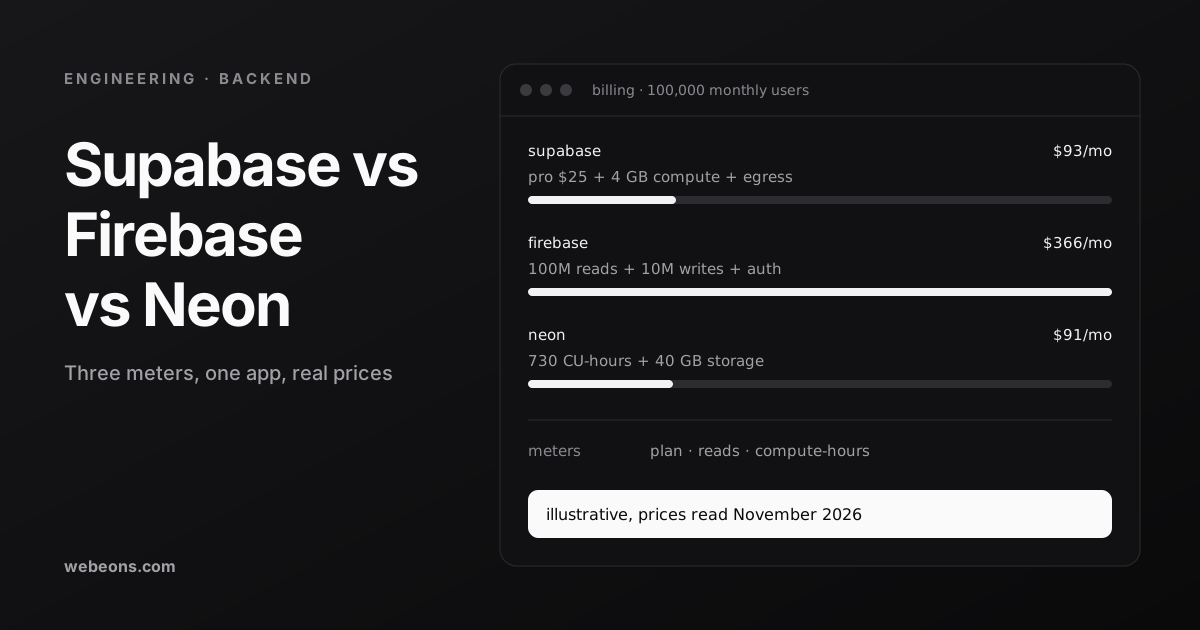
Three things stand out with our default inputs. At the prototype level, all three are free. At launch, with 10,000 monthly users, Firebase is cheapest at about $7, Neon about $21 if busy 12 hours a day, and Supabase $30. At 100,000 users, Firebase climbs to about $366, and $275 of that is sign-in fees above 50,000 users, while Supabase and Neon stay at about $91 to $93.
Read those results with care. The Firebase reads are an assumption, and an app with live listeners on busy screens can read far more than our default. Neon only wins on compute if the database is really idle part of the day. And Supabase's price includes things the others bill separately, such as file storage and edge functions.
Auth and Row-Level Security
All three let a browser or mobile app talk to the database directly. That is convenient and also the main risk, because the access rules are then your only defense.
On Supabase, those rules are Postgres row-level security policies. Its docs say to enable RLS on every table in an exposed schema, and that once it is on, no data is reachable through the API with a publishable key until you write policies. A secret key can bypass RLS, so it must never reach a browser. A typical owner policy looks like this:
alter table projects enable row level security;

create policy "owners read their projects"
on projects for select
to authenticated
using ((select auth.uid()) is not null and owner_id = (select auth.uid()));
On Firebase, Security Rules do the same job for Firestore, Storage and Realtime Database, using a separate rules language rather than SQL. On Neon, the Data API is a REST layer over your database, and its docs are plain that it has no permission layer of its own: a missing or wrong policy can expose a table to anyone with the endpoint URL. Neon Auth, built on Better Auth, stores users and sessions in a neon_auth schema inside your own database.
Whichever you choose, test the rules as if you were an attacker. Our production checklist has a one-line test for exposed tables, and our guide to multi-tenant SaaS architecture covers RLS policies across many customers in depth.
Vector Search for AI Features
If your product will search by meaning, for a support bot or recommendations, all three can store embeddings. Supabase and Neon use pgvector, the Postgres extension, which supports HNSW and IVFFlat indexes. Neon's docs list it on every plan with no add-on.
Firestore has built-in vector search with some firm limits: the index type must be flat, embeddings can have up to 2,048 dimensions, and a nearest-neighbor query returns at most 1,000 documents on Standard edition. Real-time listeners are not supported for these queries.
The bigger question is whether vectors live beside the rest of your data. On AskOrac, our AI support platform built on Next.js, Supabase and pgvector, we kept vectors in Postgres so chunks, documents and tenants share one database, and isolation, joins and backups stay simple, with no second system to keep in step. The trade-off, in the case study's words, is that filtered vector search needs careful tuning at scale. The multi-tenant guide tells that story in full.
Lock-In and Your Exit Path
Plan the exit before you need it. The three differ more here than anywhere else.
| What you take with you | What needs rework | |
|---|---|---|
| Supabase | A standard Postgres dump of roles, schema and data, via its CLI. It can also be self-hosted with Docker | Files copied separately, edge functions redeployed, auth and storage policies recreated. Self-hosting drops branching, managed backups and point-in-time recovery |
| Neon | Plain Postgres, with the usual Postgres tools | Branching and scale-to-zero, if your workflow relies on them |
| Firebase | A managed export to Cloud Storage in LevelDB log format, on the Blaze plan. It imports into another Firestore database | Moving off Firestore means remodeling documents into tables and rewriting queries and rules |
Postgres is the safer bet for leaving, because the database underneath is the same everywhere. Firestore lock-in is real but often acceptable: if the app is built around live sync and the data fits documents, you may never want to leave.
When to Use None of Them
In our judgment, skip all three in these cases:
- You already run on a cloud with an operations team. A managed Postgres from your existing provider, with your own auth, keeps everything under one set of controls and contracts.
- Long-running work is the product. Jobs that take minutes need workers and queues. A backend platform can store the results but should not be where the work runs.
- Strict residency or contract terms. Check each region list and contract against your obligations before you build. If none fits, host it yourself.
- Mostly analytics. Large scans over history belong in a warehouse, with the app database kept for transactions.
What We Run, and Why
Our three products all use Supabase. AskOrac runs on Next.js, Supabase and pgvector. BlurbBio uses Supabase for Postgres, auth and file storage. Shelf Inn, our home library app for iOS and Android, uses it for its database and sign-in.
It does not do everything, and we do not ask it to. In BlurbBio, reading a whole novel can take many minutes, far past a serverless request, so that work runs in separate Python services that the app starts and polls as jobs, with Upstash Redis for fast shared state. That is the pattern we would expect for any product with heavy background work, on any of these three.
Where This Is Heading
- Safer defaults on Supabase. Its changelog says new tables in
publicare no longer exposed to the Data API without an explicit grant: the default for new projects from May 30, 2026, and for all existing projects from October 30, 2026. Existing tables keep their grants, so older apps still need a review. - Neon inside a larger company. Neon announced on May 14, 2025 that it would join Databricks, saying it would keep building the product. Watch the pricing page and terms over time, as with any acquisition.
- Firebase is adding Postgres. As of November 2026, Firebase's pricing page lists Data Connect on Cloud SQL for PostgreSQL from $9.37 a month after a three-month trial. The Postgres versus documents choice no longer means leaving Google.
- Auth is moving into your database. Neon's managed Better Auth keeps users and sessions in your own Postgres, so they branch with your data. Expect less separation between "auth provider" and "database" in new stacks.
What We Would Pick
For a new web product with relational data and a small team, we would start on Supabase Pro, write RLS policies for every table on day one, and keep heavy jobs outside it. If you only need a database and already have auth, Neon is cheaper when idle and its branching is excellent for teams shipping often. Choose Firebase for a mobile-first app built around live data that fits documents, and price your sign-in before you pass 50,000 users.
If you want a second opinion on your data model or the bill, our backend and API team designs and builds on all three. Send us your main screens and expected usage, and we will tell you which one we would choose, and why. If your product will also open its data to AI assistants, our guide to MCP servers is the next read.
Sources (24)
Common questions
Is Supabase cheaper than Firebase?
It depends on usage. At small scale both can be free. In our illustrative estimate, Firebase is cheaper at 10,000 monthly users, while at 100,000 users Supabase costs far less, mainly because Firebase sign-in is charged above 50,000 monthly users. Prices are as of November 2026.
What is the difference between Supabase and Neon?
Both are Postgres. Supabase bundles auth, file storage, edge functions and realtime, with always-on compute. Neon is a serverless Postgres database billed by compute-hour that scales to zero when idle and supports branching, with optional managed auth.
How does Firebase pricing work?
Firestore bills per document read, write and delete, after a daily free quota of 50,000 reads, 20,000 writes and 20,000 deletes. Every query costs at least one read, and live listeners are charged when documents in their results change. Storage, egress and sign-in above 50,000 users are billed separately.
Can I migrate from Firebase to Supabase later?
Yes, but it is real work. Firestore's managed export uses a LevelDB format that imports into Firestore, so moving to Postgres means remodeling documents into tables and rewriting queries and security rules. Moving between Postgres hosts is much simpler.
Which is best for AI and vector search?
Supabase and Neon both support pgvector with HNSW and IVFFlat indexes, alongside the rest of your data. Firestore has built-in vector search with a flat index, up to 2,048 dimensions and at most 1,000 results per query on Standard edition.
Get a second opinion on your backend choice
Send us your main screens and expected usage. We'll tell you whether we'd build on Supabase, Neon or Firebase, show you the bill we'd expect, and flag what would be hard to change later.