Website Redesign Cost, and How to Keep Your SEO
What a redesign costs, why redesigns lose rankings, and a migration checklist built on Google's documentation, with a tool that estimates your budget and your risk.
A website redesign has two prices: the invoice, and whatever it does to the traffic you already earn. Most budgets cover the first and treat the second as a launch-week task. That is backward, because the redesign can be perfect and the business can still lose leads if nobody mapped the URLs. Here is what a redesign tends to cost, what the SEO work involves, and how to keep your rankings through the move.
If you are building something new, our guide to what a website costs is the better read. This one is for sites that already have traffic to lose.
What a Website Redesign Costs
These are published planning figures from agencies that sell this work, and we are one of them, so read them as asking prices.
Both sources agree on what moves the figure. Webstacks says the number of distinct templates matters more than the total page count, which matches our view: forty pages on three templates is a smaller job than twelve pages on twelve templates. Clique lists the same pressures: templates, custom functionality, integrations, content migration, and SEO migration planning. Webstacks also warns that content production, photography, branding, software fees and CMS licensing can sit outside an estimate, so ask what yours excludes.
Neither source prices the SEO migration on its own, and we could not find a published figure we trust. Treat it as scoped work inside the project, and ask to see it as a line in the proposal.
Estimate Your Redesign and Your Risk
The tool below does two jobs. For the estimate, your page count selects a published band from Clique's guide. Your templates, CMS, URL and integration answers then choose the lower, middle or upper third of that band. Those thirds are our own simplification, so use the result to set a budget range, never as a quote.
For the risk score, each change adds points, weighted by how much it can disturb search: URL changes count most, followed by a domain change and a CMS move. The checklist subtracts risk as you finish items. The weights are our judgment. The checklist items come from Google's documentation.
Why Redesigns Lose Rankings
Search engines rank URLs and the content on them, so most losses come down to one of five events, and each is avoidable:
- URLs change without redirects. Old links return errors, and the signals built up on those pages have nowhere to go.
- Content gets cut. A shorter, prettier page can drop the text that earned the ranking. Compare old and new page text before launch.
- Internal links change. A new menu can leave important pages several clicks deeper, or orphan them entirely.
- The staging block ships. A
noindextag or a blockingrobots.txtsurvives into production. Google's guide tells you to list these for removal in advance. - Rendering changes. A new framework may ship less HTML to crawlers. Our WordPress vs Next.js comparison covers how to think about that.
You should also expect some movement even when you do everything well. Google says plainly that visibility may fluctuate temporarily during a move, and that a small to medium site can take a few weeks for most pages to move. We have seen public studies on recovery time, but their figures conflict and we could not read the originals, so we will not quote one. The one promise anybody can honestly make is a careful process. Rankings cannot be guaranteed.
Do Not Change Everything at Once
This is the most valuable sentence in Google's guide, and the one most redesign plans ignore. Google advises planning changes one after the other, for example moving to a new domain and then changing the layout. The reason is practical. If traffic falls after five simultaneous changes, you have no way to tell which one did it.
There is a fair objection: running two projects costs more, and a CMS move often forces a new front end anyway. When you must bundle changes, protect the most valuable part. Keep URLs identical if you can, because a redesign on the same URLs is far safer than one that moves them. If your URLs are ugly but ranking, we would usually leave them alone for now.
| Stage | What changes | What you check |
|---|---|---|
| 1. Baseline | Nothing | Rankings, top pages, conversions and crawl data saved |
| 2. Platform move | CMS or hosting, same URLs and similar design | Logs, crawl errors, indexing |
| 3. Settle | Nothing | Traffic and rankings return to baseline |
| 4. Redesign | Templates and layout | Page text and internal links against baseline |
| 5. URL or domain change | Only if it is worth the risk | Redirect map, old and new sitemaps |
Website Migration SEO Checklist
This follows Google's documentation on site moves with URL changes, last updated in August 2026.
Before launch
- Crawl the old site and export every URL. Google suggests gathering them from sitemaps, server logs, your CMS and analytics.
- Save a baseline of top pages, queries and conversions.
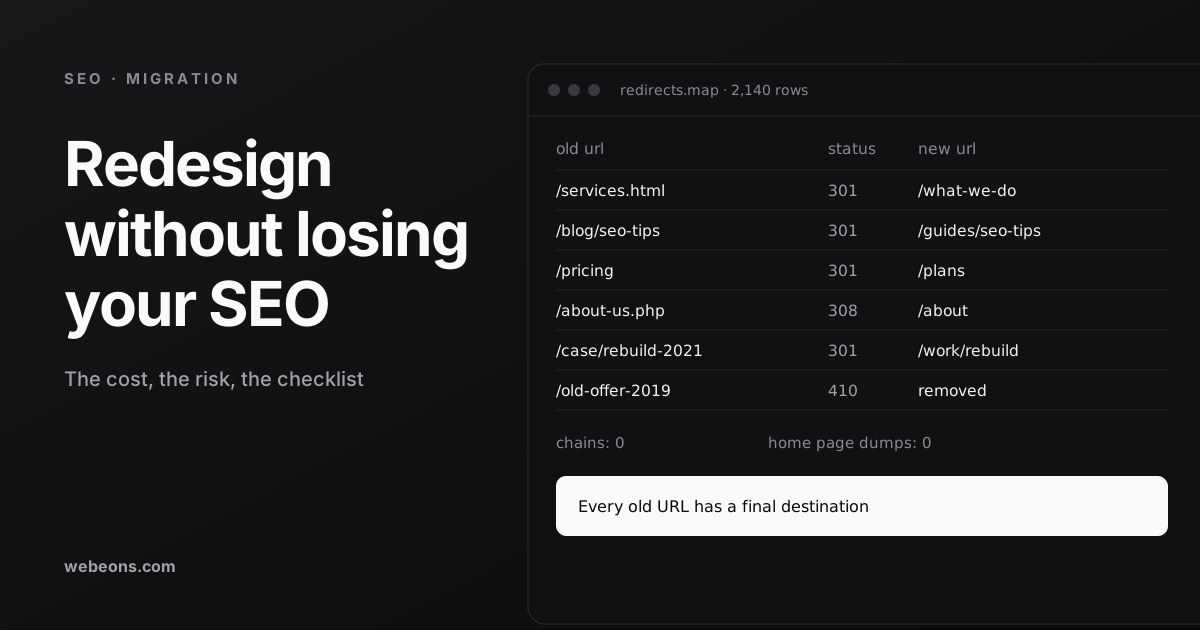
- Build the redirect map. Assign every old URL a single final destination on the new site.
- Decide what is really being removed. Google says such content should return 404 or 410, and should not redirect to an irrelevant page such as the home page.
- Prepare the new site: self-referencing canonicals, updated internal links, updated hreflang if you use it.
- List every
noindexrule androbots.txtblock that must come off at launch. - Check that the server can take the load. Google says it will temporarily crawl the new site more heavily than usual, and that large sites should warn their host in advance.
Launch day
- Turn on server-side permanent redirects. Google recommends 301 or 308, and treats client-side redirects as a last resort.
- Remove staging blocks and test a sample of old URLs, especially your top pages.
- Submit the new sitemap. Keep the old one too, so you can watch it empty.
- If the domain changed, verify all variants and use Search Console's Change of Address.
After launch
- Watch server logs and Search Console for unexpected errors.
- Fix the 404s that matter first, starting with pages that had links or traffic.
- Keep redirects for at least a year. Google says keeping them indefinitely is also reasonable for users.
What a Good Redirect Map Looks Like
A redirect map is a plain spreadsheet with two columns, and it decides most of the outcome. Three mistakes do most of the damage. Temporary redirects keep the old URL in results, since Google uses only permanent ones as a signal for the new page to be canonical. Chains waste time, and Google advises going directly to the final destination, with no more than three hops ideally. And dumping everything on the home page discards the relevance of each page.
Keep the map in version control or a shared sheet, assign one owner, and test it with a script before launch. A CMS plugin works for a small map, but we prefer redirects at the server or edge, so that they run before the application and survive the next rebuild.
If you are only changing hosts and keeping URLs, the risk is far lower. Google's separate guide suggests lowering DNS TTL about a week before, keeping the old host running until traffic to it reaches zero, and expecting a brief dip in crawling after launch.
Questions to Ask Before You Accept a Quote
A redesign proposal can look complete and still leave search to chance. Put these to any agency, including us, before you sign:
- Is the redirect map in scope, and who owns it? Ask for a name.
- Will you compare old and new page text and internal links before launch?
- How is staging kept out of search, and who confirms those blocks are gone on launch day?
- Who watches logs and Search Console after launch, and for how long?
- What do you do if a template loses traffic?
The monitoring answer is the easiest to compare. Clique's guide describes 30 days of post-launch support on a small project and 60 to 90 days on a $100,000 project. Google gives no fixed period, so treat those as one agency's practice. Make sure someone is paid to look during that window, because that is when mapping mistakes surface and are still cheap to fix.
Where This Is Heading
Two shifts raise the stakes of a clean migration.
- AI answers sit on the same foundation. Google's December 2025 guidance says a page needs to be indexed and eligible for a snippet to appear in AI Overviews or AI Mode, with no special optimization required. A botched migration can therefore cost you AI visibility as well as links. Our guide on getting cited by AI search covers the rest.
- Google keeps refining this guidance. The site move guide was updated in August 2026 and the redirect guide in April 2026. Check the live pages before you start, because a checklist from a few years ago may be out of date.
What We Would Do First
Before anyone opens a design tool, export your top 100 pages by traffic and by links. Those pages decide what you can safely change. Then decide whether the URLs need to move at all. Often they do not, and that one decision removes most of the risk.
If you want help, our web development service handles redesigns with the migration planned from day one, and our WordPress migration work is listed at $10,000–$35,000. Send us your site and your plans, and we will tell you where the risk sits, including when a smaller refresh would do. Check your foundations with our technical SEO checklist.
Sources (6)
Common questions
How much does a website redesign cost?
Agencies publish planning ranges from about $15,000 to $40,000 for sites of 10 to 20 pages, $40,000 to $100,000 for 30 to 75 pages, and $100,000 and up for larger sites. The templates, integrations and CMS moves drive the figure.
How do I redesign a website without losing SEO?
Keep URLs the same if you can. If they must change, map every old URL to a final destination, use server-side permanent redirects, compare page text and internal links, and change one thing at a time.
How long should I keep redirects after a site migration?
Google says to keep redirects for as long as possible, with about a year as a minimum. It adds that keeping them indefinitely is also reasonable from a user's perspective.
Will my rankings drop after a redesign?
Google says visibility may fluctuate temporarily during a move. Careful planning reduces the risk, but nobody can guarantee rankings. A small to medium site can take a few weeks for most pages to move.
Find out where your redesign can go wrong
Send us your site and what you plan to change. We'll tell you where the search risk sits, what we would do first, and whether a smaller refresh would do.