AI Automation for Small Businesses: n8n vs Zapier vs Make
What Zapier, Make and n8n really charge for the same workflow, when you need no AI at all, and the point where a custom build starts to pay off.
If your team retypes the same details between the same apps every day, you probably need a $20-a-month automation, not an AI project. For most small businesses the right order is simple: fix the process, automate it with fixed rules, then add AI to the one or two steps that truly need judgment.
This guide compares Zapier, Make, n8n and a custom build on what they really charge, with prices read from each vendor's page on October 31, 2026. We sell custom AI integration, so a custom build is the option we have a reason to favor. For most of the jobs below, we would tell you not to buy it.
Do You Need AI at All?
Often you do not. If the input is structured and the rule can be written down, a plain workflow is cheaper, faster and easier to trust, because it does the same thing every time. AI earns its place when the input is messy: an email in someone's own words, a PDF with no fixed layout, a request that needs a draft reply.
| The job | What you need | Keep a person? |
|---|---|---|
| New form entry goes to the CRM and a sheet | Fixed workflow, no AI | No |
| Paid order creates an invoice and a receipt | Fixed workflow, no AI | Only for exceptions |
| Sort incoming email by topic and urgency | Workflow with one AI step | At first |
| Pull totals from supplier PDFs | Workflow with one AI step | Yes, on anything that pays money |
| Draft replies to customer questions | Workflow with one AI step | Yes, until measured |
| Work out the steps itself, across several systems | An AI agent | Yes, with approvals |
If you are unsure about the last rows, our guide to chatbots and AI agents shows the difference. Most small businesses do not need an agent yet, and you would not be behind. The Census Bureau's survey data shows how early this still is.
n8n vs Zapier vs Make: How Each One Counts
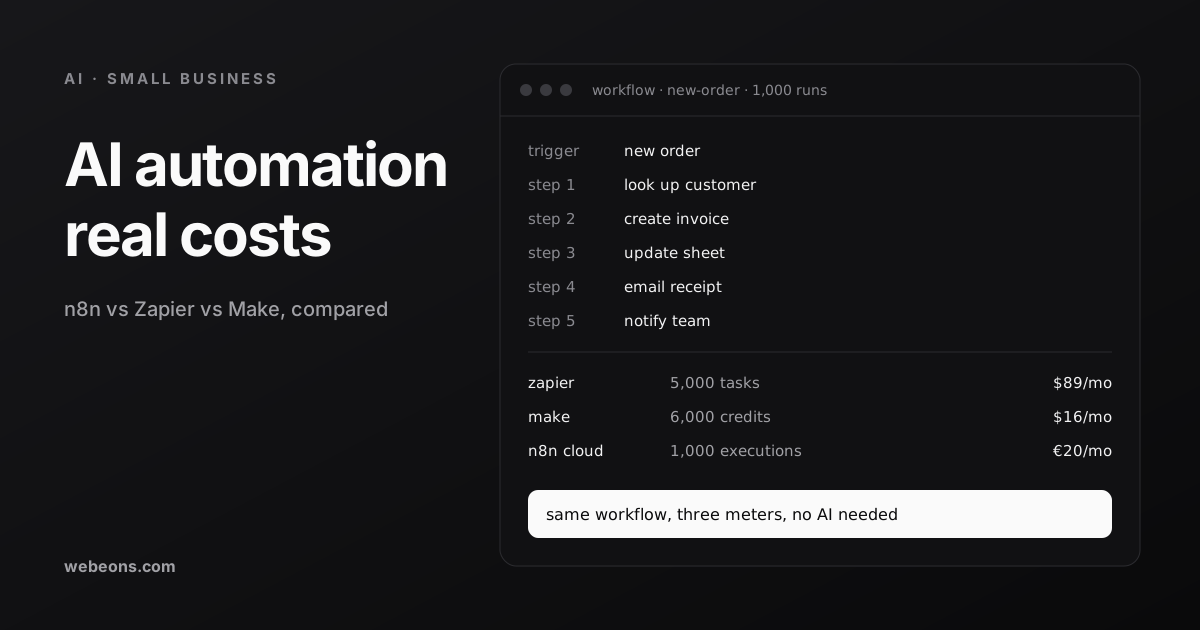
This is the part that decides your bill. All three price by usage, and they use different units for it. Here is one run of an order workflow, counted three ways.
Zapier. A task is a successful action. Triggers, filters, paths, formatter steps and failed actions cost nothing, which rewards tidy workflows. AI steps sit on a rate card: 1 task on a standard model, 3 on advanced and 5 on premium, plus the same for each tool call on the higher tiers.
Make. Almost every module action costs a credit, including reading and transforming data, while routers and error handlers are free. The page warns that a single run can use "anywhere from two credits to thousands", because looping over rows counts each one. Check that before you trust a low estimate. Features using Make's AI Provider may use more than one credit.
n8n. An execution is one full run, regardless of steps or data. Long workflows are therefore cheap on n8n and costly on Zapier. The trade is a stricter limit elsewhere, since Starter allows 5 concurrent executions and a 5-minute maximum per run. Pro allows 20 or 50 concurrent, depending on tier, and 40 minutes.
What Zapier, Make and n8n Cost
| Zapier Pro | Make Plan | n8n Cloud | |
|---|---|---|---|
| Free tier | 100 tasks, two-step Zaps | 1,000 credits, 15-minute interval | Free trial, 14 days |
| Entry paid plan, billed yearly | $19.99 for 750 tasks | $9 for 5,000 credits | €20 for 2,500 executions |
| Entry, billed monthly | $29.99 | $10.59 | €24 |
| Next size up, billed yearly | $129 for 10,000 tasks | $16 for 10,000 credits | €50 for 10,000 executions |
| Larger, billed yearly | $489 for 100,000 tasks | $153.45 for 150,000 credits | €1,450 a year for 50,000 executions |
| At the limit | Pay-per-task if on, up to three times your plan, or it stops | Stops until you add credits, at 25% more | Capped, with no overage on Starter and Pro |
One note on Make: older comparisons still quote Core, Pro and Teams plans. Its pricing page now shows one Make Plan sized by credits, and the numbers above come from that page. Some third-party posts disagree with each other on this, so treat any Make price you did not read today with care.
When Zapier is right. You have no technical help, short workflows and few runs. You pay more per step than on the other two, and in our judgment that can be worth it when a person's time is the real cost.
When Make is right. You want branching visual workflows and low cost per action, and someone on the team enjoys building them. It rewards a little more care, particularly around loops.
When n8n is right. Workflows are long, volume is steady, or you want code steps and your own hosting. n8n Cloud needs less skill than self-hosting, and it is still the most technical of the three.
About self-hosting. The free Community edition is real, but it is not free to run. n8n's own docs say technical expertise is required and that infrastructure and maintenance are your responsibility. Its Sustainable Use License limits use to your own internal business purposes, or to non-commercial or personal use, so read it first if you plan to build n8n into something you sell. A 2 GiB DigitalOcean server is $12 a month. Your own updates, backups and security are the larger cost. For a business with nobody technical, we would not self-host anything that touches customer data.
Compare Your Own Numbers
Enter one workflow and what the time is worth. The chart redraws each plan's price as volume grows, including the point where a custom build costs less than each platform.
When a Custom Build Pays Off
On fees alone, seldom. With the default inputs, a custom build beats Zapier only above 10,000 runs a month, and it does not beat Make or n8n Cloud within the tool's range. That result is illustrative, and it is why we would not sell custom work on price at low volume.
Custom earns its cost for other reasons. Consider it in these cases:
- The logic is your competitive edge, such as your own pricing or scheduling rules.
- A wrong action costs real money, so you need strict control over retries, approvals and audit trails.
- Data cannot pass through another vendor.
- Your workflow is outgrowing the platform: too many branches for anyone to follow, or runs that hit time limits.
Retries are the classic example. Zapier's help page notes that replaying a run reruns steps that already succeeded. On a sheet that is harmless. With money it is not. When we built billing for BlurbBio, a request could time out while the job behind it kept running, leaving credits held for work the author never saw. So each job reserves credits against its own ledger key, commits only on delivery and releases otherwise, and scheduled sweeps reconcile anything left open. A retry cannot charge twice. That took custom engineering, and most small business workflows will never need it.
What Breaks First
In our judgment, these cause more trouble than the choice of tool. All of them apply on any platform.
- Silent failure. A connection expires and nobody notices for a month. Send every failure to one named person.
- No owner. The person who built it leaves, and the logins were theirs. Use a shared account, and write down what each workflow does.
- Automating a bad process. A messy process just fails faster. Fix it first.
- AI with no check. Start with a person approving the output, and measure before you remove them. Our piece on why AI projects fail covers how, and the pre-mortem there works at this scale too.
- Forgotten usage. One loop can use a month of credits. Set an alert, or leave pay-per-task off until you know your numbers.
Where This Is Heading
- Pricing is moving to usage rate cards. As of October 2026, Zapier's pricing page says AI steps, code and its SDK all follow the same task-based model. Compare AI workflows on the rate card, not the plan name.
- Plans are being restructured. Make's page now shows one plan sized by credits, and n8n's page records a Business price history dated October 26, 2026. Recheck prices before you commit to a year.
- Agents are arriving in these tools. Zapier meters Agents on a separate activity quota, n8n lists AI Agent nodes on its plans, and Make lists AI Agents in beta. Treat these as new features and test them on low-risk work.
- Small firms are not rushing. In the Census Bureau's article, use by firms with fewer than 20 employees did not change significantly through May 2026, while it rose among firms with 20 or more.
What We Would Do First
- List the five tasks your team repeats most, with hours per month.
- Pick one with clear rules and low risk, then fix the process on paper.
- Build it on a free or entry plan, with failures going to a named person.
- Run it for a month, then compare the real usage with your estimate.
- Add AI to one step only where a person can check it.
You do not need us for that, and you should try it yourself first. If a workflow touches money, customer data or several systems, or you have outgrown your platform, that is when our AI integration team can help. Tell us the task and your monthly volume, and we will say whether we would use Zapier, Make, n8n or custom code.
Sources (12)
Common questions
Which is cheaper, n8n, Zapier or Make?
It depends on the workflow. For 1,000 runs of five action steps on yearly billing, as of October 2026, Zapier costs $89 a month, Make $16 and n8n Cloud €20. Zapier and Make charge more as steps grow, while n8n counts each run once.
How does n8n count executions compared with Zapier tasks?
n8n counts one execution for a full workflow run, whatever the number of steps. Zapier counts one task for each successful action step, and triggers, filters and paths are free. Make counts a credit for most module actions.
Is n8n really free?
The self-hosted Community edition has no license fee, but you run the server, updates, backups and security yourself. Its Sustainable Use License limits use to your own internal business purposes, or to non-commercial or personal use. n8n Cloud is paid.
Does a small business need AI to automate work?
Usually not at first. Moving structured data between apps follows fixed rules, so a plain workflow is cheaper and more reliable. Add AI to steps that read messy text or draft words, and keep a person checking at the start.
When is a custom automation worth building?
Rarely on fees alone at low volume. It makes sense when the logic is your edge, a wrong action costs real money, data cannot pass through another vendor, or your workflow has outgrown the platform.
Tell us the task you want off your plate
Send us the task, your monthly volume and the apps involved. We'll say whether Zapier, Make, n8n or custom code fits, even when that means you don't need us.