React Native vs Capacitor vs Flutter in 2026: How to Choose
We sell React Native and shipped Shelf Inn on Capacitor, so here is the bias up front, the real costs we traced on a live app, and a picker for your project.
The right framework depends less on benchmarks than on what you already own. A company with a working web app has a different answer from a company starting clean, and most comparisons skip that. So here is how we would choose among React Native, Capacitor, Flutter and Kotlin Multiplatform in 2026, with the real costs we have seen on a shipped app.
Declare our position first. Webeons sells React Native builds through our mobile app service. We also built Shelf Inn, our own home library app for iOS and Android, on Capacitor. The Flutter and Kotlin sections rest on official docs, with no first-hand detail from us. We have run no benchmarks for this article and quote none.
How Each Framework Puts Pixels on Screen
Almost every practical difference between these tools follows from how they render.
- Capacitor runs your web app in a native container and describes itself as a cross-platform native runtime, with access to native SDKs when you need them. Your interface is HTML, CSS and JavaScript in a web view.
- React Native runs JavaScript, but at runtime it creates the corresponding Android and iOS views for your components.
- Flutter has its own implementation of each control and paints them through its engine. It bypasses system widget libraries, and native views join through platform views, which the docs suggest for complex controls such as maps.
- Kotlin Multiplatform shares logic written in Kotlin, while the interface can stay native or use Compose Multiplatform. JetBrains made it stable in November 2023, and Google announced official support for shared business logic at I/O 2024.
| Capacitor | React Native | Flutter | Kotlin Multiplatform | |
|---|---|---|---|---|
| Language | JavaScript or TypeScript | JavaScript or TypeScript | Dart | Kotlin |
| Interface drawn by | Web view | Platform views | Flutter engine | Native, or Compose |
| Reuse from a web app | Nearly all | Logic, some components | Little | Little |
| Platform feel | Up to your CSS | Native controls | Flutter's versions | Native, if you keep native UI |
| Main risk | Web view limits | Native build upkeep | Hiring, Dart lock-in | Two interfaces to staff |
| Best first question | Is our web app good on a phone? | Is mobile the main product? | Is the interface highly custom? | Do we already have native teams? |
Pick a Framework for Your App
Five questions give a recommendation and its main downside. Each answer adds points, and the bars show the totals so you can see what moved them. The points are our opinion, and they are open for you to disagree with. Where the top two are close, we say so, and you should build one real screen in each.
Capacitor vs React Native
This is the choice most web companies really face. Capacitor's pitch is simple: if it works in the browser, it probably works in the app. For content apps, internal tools, dashboards and account areas, that is close to the truth. You keep one codebase, and every fix reaches every platform.
React Native costs more up front, because your web components do not carry over directly. You get real platform views, so lists, gestures and text inputs behave the way the operating system intends. If people will open your app many times a day, that difference shows. If they open it monthly to check an invoice, it probably does not.
One risk applies to Capacitor directly. Apple's guideline 4.2 says an app should go beyond a repackaged website, and that one that is not useful, unique or app-like does not belong on the App Store. So plan real device features into a Capacitor app, such as offline use, camera or push, before you submit it.
What Shelf Inn Taught Us About Capacitor
Shelf Inn is a stress test for a web view: a home library that turns your books into a real-time 3D room, built with Next.js and three.js. By our own rule above, a 3D app should not start on Capacitor. We chose it anyway, because the web app already existed. Capacitor wraps that code for iOS and Android, all three platforms get every fix, and the web build doubles as our test bed. It paid off, and here is the bill.
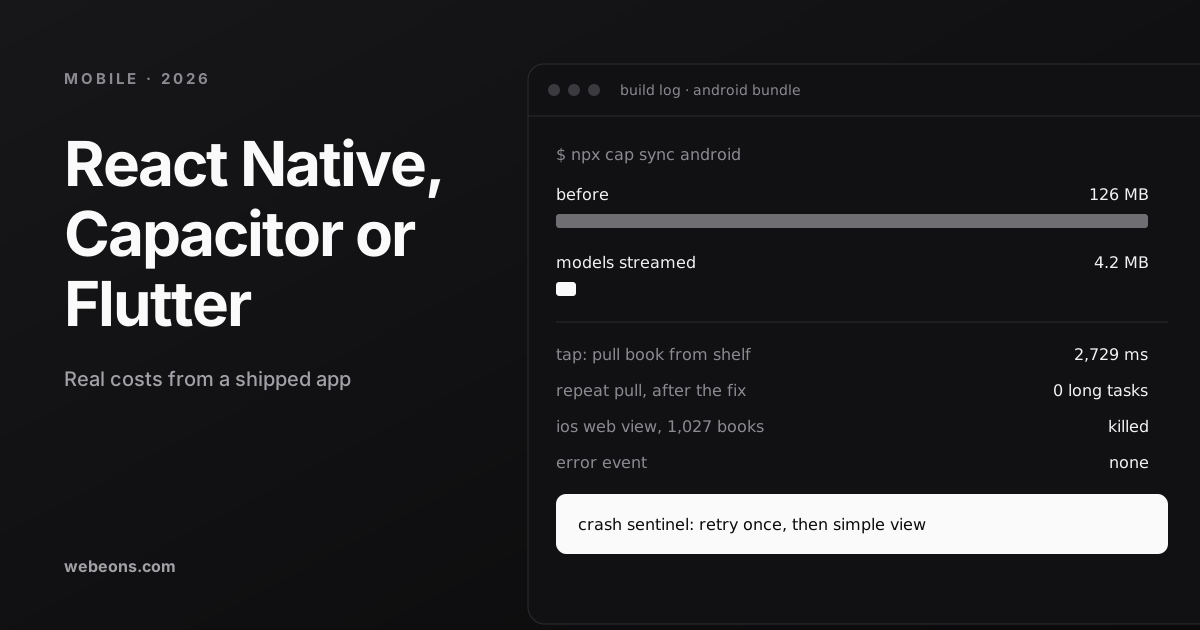
The app that weighed 126 MB
The build had been copying 122 MB of 3D models into the package. One loader rule now rewrites model URLs inside the app, so models stream from the web with long-lived caching, while textures stay local so first paint does not wait on the network. The trade-off is that the room needs a connection to load its models on first use. Web bundlers will happily package everything, so check your bundle before your first store upload.
The 2.7-second tap
Pulling a book from the shelf froze the page for 2,729 ms. Tracing found two causes: one action reconciled about 5,000 scene components and then built a new renderer, and a background cover search re-rendered the whole room every 450 ms. This is one real benefit of the web view route: web profiling applies, so a freeze like this shows up in an ordinary trace.
The fix was to take the hot path away from React: the pull became imperative, the scene sits behind a memo boundary, the inspector shares one renderer, spine painting moved to an idle queue, and cover updates are batched. After the first open, repeat pulls measured zero long tasks.
When iOS kills the web view
This is the failure a web developer does not expect. On a 1,027-book library, iOS killed the app's web view outright, with no error event to catch. The cost came from textures, objects and a data pull carrying every spine image. An error boundary cannot catch a process that no longer exists, so we built a phone tier with its own render budget, stopped pulling image columns to phones, and added a crash sentinel.
Phones now render up to 800 books and say so plainly when a library is larger. That limit is the honest price of the choice. A fully native renderer might go further, and it would have meant a second codebase. We would make the same decision for Shelf Inn. We would not recommend it for a graphics-heavy app with no existing web product, where Flutter or native deserves a hard look.
Flutter vs React Native in 2026
Both are mature, so decide on people and interface. React Native's big structural change is finished: since 0.82 in October 2025 the New Architecture is the only architecture, and 0.84 made Hermes V1 the default engine in February 2026. Version 0.88, released October 19, 2026, is the third release without user-facing breaking changes, after 0.83 and 0.86.
Flutter's strength is control. Impeller is the only supported renderer on iOS and the default on Android API 29 and above, falling back to OpenGL on older devices. Flutter 3.47 shipped in August 2026, with Widget Previews now stable. Because Flutter draws its own controls, your app looks identical on both platforms. That is ideal for a strong brand interface. It is a cost if users expect each platform's own behavior, and it means your interface tracks Flutter's versions of those controls.
Our rule: if your team writes React, stay in React. If you are hiring fresh and the interface is highly custom, give Flutter serious consideration, even though our mobile service centers on React Native. Our MVP work starts by asking which of these you are.
What the Adoption Data Can and Cannot Tell You
We wanted to give you clean market share numbers from the 2026 Stack Overflow survey, and we cannot. In the published 2026 data we could read, Flutter appears at 0.2% in the web technologies table, a question it does not really belong to, and we could not find React Native or Capacitor figures. So we will not quote a comparison from it.
npm downloads are no substitute. Both packages show millions of downloads a month, but those counts include automated builds, they say nothing about shipped apps, and Flutter is not distributed through npm at all. All they show is that both projects are in heavy active use. Market share should not decide this anyway. Your team and your existing code should.
Where This Is Heading
Three shifts are visible in the release notes.
- iOS packaging is converging on Swift Package Manager. Capacitor 8 made it the default for new projects in December 2025, Flutter 3.47 expanded its guides, and React Native 0.88 added experimental support. Expect fewer CocoaPods problems and one more migration.
- React Native upgrades are getting calmer. With legacy code being removed and several releases free of breaking changes, one old objection is weakening. Budget for upgrades anyway.
- Platform rules keep forcing work. Flutter 3.38 had to adopt Apple's mandated UIScene lifecycle, React Native 0.88 added SceneDelegate support, and Capacitor 8 needs Xcode 26 and new edge-to-edge handling on Android. Whichever you pick, plan yearly platform work.
If you plan to push features through a web view, read Apple's guideline 2.5.2 first. It restricts apps that download or execute code which changes features or functionality.
What We Would Do First
- Write down what you already own: web code, skills and users.
- List the three hardest screens or device features, and ignore the rest for now.
- Build the hardest screen in your top two options, on a cheap phone, in a week.
- Trace it. Choose on what you measure, not on someone else's benchmark.
If you want a second opinion, send us your web stack and your hardest screen, and we will tell you what we would pick, including when it is not React Native. Our mobile app service covers the build. If your first version came from an AI tool, start with our production checklist.
Sources (14)
Common questions
Is Capacitor better than React Native?
It depends on what you own. Capacitor suits a good existing web app that needs to reach both stores. React Native suits mobile-first products from React teams, because its components are backed by real platform views.
Should I choose Flutter or React Native in 2026?
If your team writes React, stay with React Native. If you are hiring fresh and the interface is highly custom, Flutter deserves serious consideration, because it draws every control itself. We sell React Native, so weigh that.
Will Apple reject a Capacitor app?
Apple's guideline 4.2 says apps should go beyond a repackaged website and be useful, unique or app-like. A Capacitor app can pass if it offers real app value, so plan device features or offline use before you submit.
Where does Kotlin Multiplatform fit?
It shares Kotlin logic across platforms while the interface can stay native or use Compose Multiplatform. It suits teams that already have Swift and Kotlin skills. JetBrains made it stable in November 2023.
Get your framework choice pressure-tested
Send us your web stack, your team's skills and your hardest screen. We'll tell you what we would pick and what it will cost you, even if the answer isn't React Native.