Why Every SaaS Product Needs a Design System from Day One
A design system isn't a luxury reserved for companies with dedicated design teams and unlimited budgets. It's a force multiplier for any product team building software that will evolve over time. We've seen the same pattern repeatedly: teams that skip the design system for V1 "to save time" spend 3× longer on V2 fixing inconsistencies, rebuilding components, debating spacing values in code review, and explaining to their CEO why every page looks slightly different.
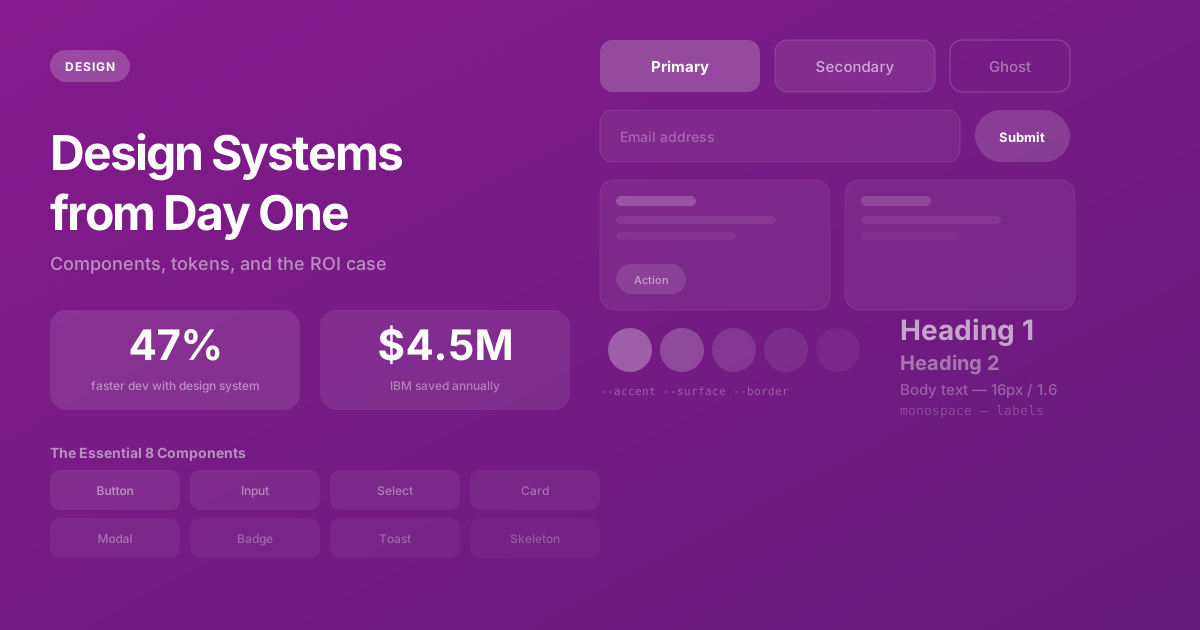
The data supports this. According to Figma's 2025 State of Design report, teams with established design systems ship new features 47% faster than teams without one. That's not a marginal improvement — it's nearly half the development time eliminated through upfront investment in shared building blocks.
What a Design System Actually Is (And Isn't)
There's a common misconception that a design system is a component library — a collection of buttons, inputs, and cards. That's like saying a language is a dictionary. A component library is part of a design system, but the system itself is much broader.
A design system is a shared language between design and engineering that defines how your product looks, feels, and behaves across every screen and every interaction. It includes four layers:
- Design Tokens — The atomic values: colors, spacing scale, typography scale, border radii, shadows, animation durations. These are the DNA of your visual identity.
- Components — Reusable UI elements built from tokens: buttons, inputs, cards, modals, dropdowns, tables, badges. Each component has defined variants, states, and accessibility requirements.
- Patterns — Compositions of components that solve recurring UX problems: navigation patterns, form layouts, data display conventions, onboarding flows, error handling approaches.
- Guidelines — Documentation that captures decisions: voice and tone, iconography rules, responsive behavior, accessibility standards, when to use which component.
The component library is the implementation. The design system is the decision-making framework that produces — and governs — the component library.
The ROI Case: Hard Numbers
The business case for design systems has been proven by companies at every scale. Here are the numbers from organizations that have published their data:
- Salesforce (Lightning Design System) — Saved designers 45% of their time and developers 35% of theirs across their entire product suite.
- Shopify (Polaris) — Reduced the time to build new admin features by 50%. New pages that used to take two weeks shipped in one.
- IBM (Carbon Design System) — Estimated $4.5 million in annual savings from reduced redundant design and development work across teams.
- Airbnb (DLS) — Reported that their design language system enabled a 60% increase in production efficiency while simultaneously improving visual consistency.
Here's a concrete example from our own work: without a design system, building a new settings page for a SaaS product typically takes a developer 40 hours. They need to design the layout (or interpret a mockup without clear specs), choose spacing values (hoping to match existing pages), build form components (or find and adapt existing ones), match button styles (by inspecting other pages), and handle responsive behavior (from scratch, for each element). With a design system, the same page takes 12-16 hours because every building block already exists, is documented, and has been tested.
Multiply that savings across every feature sprint for the lifetime of the product, and the ROI of a design system becomes overwhelming. A typical 40-hour investment in setting up a design system during week one saves 200-400 hours over the first year of development.
What "Day One" Actually Looks Like
You don't need a 200-component library on day one. You need a foundation that's small enough to build in a day or two, but principled enough to scale without breaking as the product grows. Here's exactly what we set up at the start of every project.
1. Design Tokens
Tokens are defined as CSS custom properties (variables) at the root level. Every color, spacing value, font size, and shadow in the application references these variables — never hardcoded values. This means changing your primary brand color is a single-line edit, not a 200-file search-and-replace.
/* Design tokens — the DNA of your visual identity */
:root {
  /* Colors — semantic names, not color names */
  --color-text: #171717;
  --color-text-secondary: #525252;
  --color-text-muted: #737373;
  --color-surface: #FFFFFF;
  --color-bg: #FAFAFA;
  --color-border: rgba(0, 0, 0, 0.08);
  --color-accent: #2563EB;

  /* Spacing — 4px base grid */
  --space-1: 4px;   --space-2: 8px;
  --space-3: 12px;  --space-4: 16px;
  --space-6: 24px;  --space-8: 32px;
  --space-10: 40px; --space-12: 48px;

  /* Typography — modular scale */
  --text-xs: 12px;  --text-sm: 14px;
  --text-base: 16px; --text-lg: 18px;
  --text-xl: 20px;  --text-2xl: 24px;

  /* Radii */
  --radius-sm: 6px; --radius-md: 8px;
  --radius-lg: 12px; --radius-xl: 16px;
  --radius-full: 9999px;
}
Notice: color names are semantic (--color-text, --color-surface), not descriptive (--color-gray-700). This matters because when you inevitably rebrand or add a dark mode, semantic tokens adapt automatically — "text" is always the right text color regardless of theme, while "gray-700" is meaningless in a dark theme where text is light.
2. Core Components (The Essential 8)
Start with the eight components every product needs, built with proper TypeScript types, accessibility attributes (ARIA labels, keyboard navigation, focus management), and responsive behavior:
- Button — Primary, secondary, ghost, destructive variants. Loading state. Disabled state.
- Input — Text, email, password, search. Error state with validation message. Label association.
- Select/Dropdown — Single and multi-select. Searchable. Keyboard navigable.
- Card — Container with consistent padding, border, shadow. Clickable variant.
- Modal/Dialog — Focus trap. Escape to close. Backdrop click to dismiss. Scroll lock on body.
- Badge/Tag — Status indicators. Color variants. Removable variant.
- Toast/Notification — Success, error, warning, info. Auto-dismiss. Stack management.
- Skeleton/Loading — Content placeholder animations that match the layout of the content being loaded.
3. Layout Primitives
Container, Stack (vertical spacing), Row (horizontal spacing), Grid, and Section components with consistent spacing from your token scale. These primitives eliminate the most common source of visual inconsistency: developers choosing different spacing values for similar layouts because there's no system to reference.
Keeping Figma and Code in Sync
The most common design system failure isn't building it — it's maintaining alignment between what designers see in Figma and what developers build in code. Within months, Figma diverges from the codebase, and you have two sources of truth that disagree. Designers create mockups that reference components that don't exist in code. Developers build features that don't match the Figma designs because the code components evolved independently.
Our approach to preventing this drift:
- Tokens live in code first. CSS custom properties are the single source of truth. Figma references the same values through a plugin like Tokens Studio. When a color changes, it changes in one file.
- Same naming convention. Components in Figma use the same names as React components. A designer says "use the Card component with the bordered variant" and the developer knows exactly which code to reach for —
<Card variant="bordered">. - Component documentation page. We build a
/design-systemroute in the application itself that renders every component in every variant and state. This living documentation is always up to date because it renders the actual production components.
When Not to Build a Design System
Design systems have setup costs. For some projects, those costs aren't justified:
- Single landing page — A one-page marketing site won't benefit from a component library. A simple stylesheet is sufficient.
- Proof of concept / prototype — If you're testing whether an idea has market fit and the prototype will be thrown away regardless, speed trumps consistency.
- Fewer than 5 screens with no growth plans — The breakeven point for design system ROI is roughly 5-10 screens built by 2+ developers. Below that threshold, the overhead exceeds the benefit.
For SaaS products — which have dozens of screens, multiple developers, and an expectation of continuous evolution over months and years — a design system from day one is non-negotiable. The cost of adding one later (auditing existing inconsistencies, refactoring components, retraining the team) is 3-5× higher than building it upfront.
The Bottom Line
A design system isn't about making things pretty — it's about making your team fast. Fast to build new features, fast to maintain consistency, fast to onboard new developers, and fast to adapt when business requirements change. The 40 hours you invest in week one will save you 400 hours over the first year. That's not a guess — it's what we've measured across every SaaS project we've built.
Need help with this?
We build exactly what this article describes — production-grade digital products for ambitious companies.
Start a Project →